


Spades Pop - Classic Card Game
4.73.35K Reviews
App Specs
- Version
- 1.28.0
- Updated On
- License
- Free
- Downloads
- 100,000+
- Developer
- WildCard Games
- Categories
- Card
- Platform
- Android, iOS
Screenshots
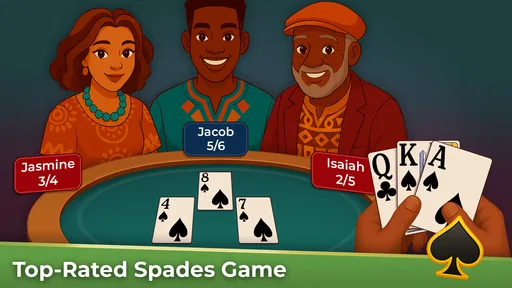




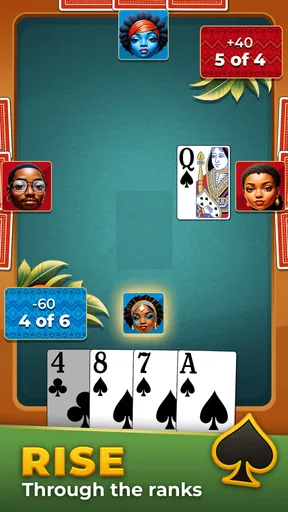

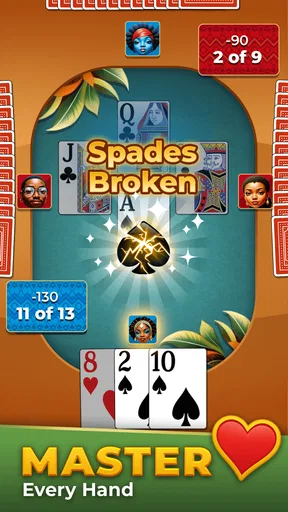
 Analysis by AppCompare
I judge a digital card game by a few practical things: can I follow the rules without fuss, can I get into a match when I have a little spare time, and does the experience make me want to think about the next hand? Spades Pop - Classic Card Game is a free card game from WildCard Games, and its appeal is clearest if you already enjoy Spades or want an approachable place to learn it. Its average rating is 4.7 from around 11,000 ratings, with over 100,000 installs, but what matters more to me is whether its familiar trick-taking format suits the way you like to play.
Start by deciding what kind of card play you want
Spades is a partnership game built around bidding and taking tricks, so the interesting decisions happen before and during each hand. You need to judge what your cards can do, account for your partner’s likely contribution, and adapt when the play does not follow your plan. That makes this a better fit for someone who enjoys reading the table than for someone looking for a fast, luck-only card game.
The game is rated for Everyone, and the tutorial makes it easier for a newcomer to get oriented with bidding, tricks, and scoring. I’d still recommend learning one idea at a time: first follow which suit is being played, then watch how trump changes a trick, and only after that focus on making more confident bids. That small learning routine is less frustrating than trying to master every choice in the first match.
What the experience is like at the table
I focus on the small decisions that make a hand easier to read: how the bidding sets expectations, what the cards already played suggest, and when it is wiser to hold back rather than chase a trick. That approach helps me enjoy the rhythm of the table without turning a casual game into a study session. From there, it is worth considering which parts of the experience matter most when choosing between Spades apps.
Familiar rules, with a learning curve worth taking slowly
First off, Spades Pop - Classic Card Game stays true to the traditional rules of Spades, which is a relief for those of us who don't want to learn a whole new set of rules. If you’re familiar with the classic four-player partnership trick-taking game, you’ll feel right at home here. The game aims to capture that authentic Spades experience while adding a few modern twists to keep things fresh.
The user interface is clean and intuitive. The developers clearly put a lot of thought into making sure players can jump right into the game without a hitch. There’s a handy tutorial for beginners, which is great because let’s face it, not everyone grew up playing Spades around the dinner table. The tutorial guides you through the basics of bidding, playing tricks, and scoring, ensuring you’re not lost at sea when you start your first match.
A readable table matters more than flashy presentation
The graphics are simple yet vibrant, giving it a lively feel without overwhelming the senses. It’s like they’ve struck the right balance between modern aesthetics and classic card game charm. The backgrounds are colorful, and the card designs are easy to read, which is essential during intense card-playing sessions.
Worth Reading Before You Choose

EA SPORTS FC Mobile 26 Is a Bigger Football Game, but It Takes Time

Flipboard Shows What News Apps Must Do Beyond the Feed

Switching to Android Auto Means Rethinking Your Driving Routine

Google Calendar Makes a Crowded Week Easier to Manage

Ludo King Makes the Most of the Minutes Between Plans

Baby Panda World Brings Quick Play to Modern Phones, but Its Game Library Feels Busy
Now, let's talk about the sound. The game features a playful soundtrack that complements the mood perfectly. It’s not intrusive and does a good job of enhancing the overall atmosphere. You can also hear little sound effects when you play a card or win a trick, which adds a nice touch to the gameplay.
Choose a match for your mood
What’s a Spades game without a little competition, right? Spades Pop allows you to play with friends or other players online, making it a social experience. It supports both online multiplayer and private rooms, so you can either challenge random players or invite your buddies for a match. The matchmaking system is fairly quick, and I never found myself waiting too long for a game to start.
Playing against others is where the real fun begins. The AI can give you a decent challenge, but nothing beats the thrill of outsmarting a real opponent. Plus, the chat feature lets you communicate with your partner, allowing for some strategic planning or just a bit of friendly banter.
Small practical choices that improve a session
For a quick break, I’d go into a match with one simple goal rather than trying to overhaul my play style every hand. For example, pay attention to whether your bids are consistently too ambitious, or whether you are overlooking chances to use trump. After a game, mentally review one key decision: did the bid match your hand, and did your card choice help your side? This kind of lightweight review makes the game more satisfying without turning a casual session into homework.
Playing with a friend is useful for a different reason. A private room gives you a familiar partner or opponent, so you can concentrate on the rhythm of partnership play instead of treating each hand as an isolated challenge. Keep any table talk friendly and simple; the value is in sharing the match, not trying to narrate every card. If you prefer anonymous competition, online opponents offer a more unpredictable test, though the social feel may be less personal.
Rewards are a bonus, not the main reason to play
As you play, you earn coins and other rewards that can be used to customize your game experience. There are various avatars and card designs to choose from, which is a neat way to personalize your gameplay. The game does offer in-app purchases, but they’re not overly emphasized, so you can enjoy the game without feeling pressured to spend real money.
However, if you’re the kind who loves to deck out your profile with the latest swag, there are plenty of options available. The developers seem to have struck a good balance between free-to-play content and premium features, which is always a plus in my book.
Where a different card game may be a better fit
The main trade-off is built into Spades itself: you need to think about partnership, bids, and a sequence of tricks. If you want a very short, low-attention game that asks little of you, a simpler solo card pastime may fit better. If you want the feeling of playing across a real table with people you know, an in-person deck remains a different kind of social experience. This app is most appealing when you want Spades on a screen, not a substitute for every kind of card night.
Likewise, players who prefer a purely solo puzzle should consider whether competing with a partner and opponents is the draw they want. The AI gives you a way to play without relying on a human rival, but it will not reproduce the banter, habits, or surprises of a familiar group. I’d choose online play for variety, a private room for a planned game with friends, and a different genre when I’m not in the mood to follow a full trick-taking hand.
Getting comfortable without changing everything at once
If you are switching from another Spades app, the rules should feel familiar, but the surrounding presentation and routines may take a little adjustment. I would start with the tutorial or a low-pressure game before judging the match flow, then settle on the interface and sound settings that feel comfortable for longer sessions. Avoid changing several habits at once: learn how this table presents the cards and scoring first, then work on your bidding.
One useful habit is to remember what has already been played in the suits that matter to your plan. You do not need to memorize every card to make better decisions; even tracking whether a high card or a likely trump has appeared can help you decide whether to lead or hold back. It is a small mental step, but it turns a string of plays into a more deliberate game.
Another practical point is to treat rewards and cosmetic choices as optional. If you mainly want the card game, there is no need to make customization your goal; enjoy the free play and see whether the core rounds hold your interest first. If collecting avatars or card designs is part of the fun for you, the reward layer gives that interest somewhere to go, while in-app purchases remain a choice rather than a prerequisite for deciding whether Spades suits you.
Version, access, and who should give it a try
The current version is 1.24.0, and it runs on Android 8.0 or later. That makes the operating-system requirement worth checking before you install, especially if you are using an older device. The game is free, so it is easy to try without committing to a purchase, while optional in-app purchases are something to keep in mind if you prefer to avoid spending inside games altogether.
I’d recommend it to a Spades fan who wants a convenient way to play online or set up a private match, and to a beginner willing to learn through a tutorial and a few hands. I’d skip it if your priority is a solo, no-pressure pastime or if the partnership strategy of Spades sounds like work rather than fun. Those are not flaws so much as useful boundaries: the game is strongest when its particular style of card play is exactly what you’re after.
My recommendation
In a nutshell, Spades Pop - Classic Card Game delivers a solid card-playing experience. It’s engaging, well-designed, and offers enough variety to keep you coming back for more. Whether you’re looking to pass the time or challenge friends, this app has got you covered.
If you’re a Spades enthusiast or someone looking to get into the game, I’d say give it a whirl. It’s free to download, so why not take a seat at the table and see if you’ve got what it takes to become a Spades champion? Happy gaming!
Pros
- Smooth and intuitive user interface.
- Various difficulty levels for all players.
- Engaging multiplayer mode available.
- Customizable avatars and themes.
- Quick matches for busy schedules.
Cons
- Occasional connectivity issues.
- Ads can be intrusive at times.
- Limited offline gameplay features.
- In-app purchases for premium content.
- Some features require constant updates.
FAQs for Spades Pop - Classic Card Game
What is Spades Pop - Classic Card Game?
Spades Pop - Classic Card Game is a digital adaptation of the traditional Spades card game. It offers a vibrant interface with engaging graphics and multiplayer capabilities, allowing players to enjoy classic card gameplay with friends or online opponents. The app is available on both Android and iOS platforms, making it accessible for a wide audience.
How do I play Spades Pop - Classic Card Game?
In Spades Pop, players are dealt a hand of cards and must strategically bid on the number of tricks they expect to win. The objective is to match or exceed your bid while avoiding penalties for overbidding. The game progresses over several rounds, and the player or team with the highest score at the end wins.
Does Spades Pop offer multiplayer features?
Yes, Spades Pop offers a robust multiplayer mode where you can compete against friends or other players online. The game provides options for both real-time matches and asynchronous play, allowing for flexibility in how you engage with others. In-app chat features also enhance the social aspect of gameplay.
Are there in-app purchases in Spades Pop?
Spades Pop includes in-app purchases that allow players to enhance their gaming experience. These purchases can include additional card decks, aesthetic enhancements, and other features that may improve gameplay. While not necessary to enjoy the game, they offer customization and added enjoyment for those interested.
What are the system requirements for Spades Pop?
For Android devices, Spades Pop requires Android version 5.0 or higher. On iOS, the game is compatible with iOS 10.0 or later. The app is optimized for both smartphones and tablets, ensuring a smooth gameplay experience across different devices. Sufficient storage and internet connectivity are recommended for optimal performance.


